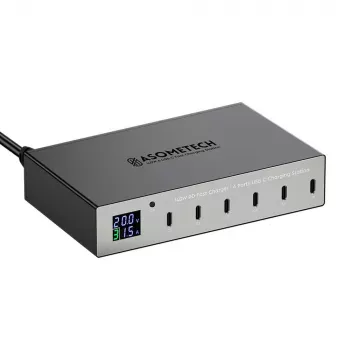
140W 6-Port PD/QC Fast Charging Station for Desk

140W 6-Port USB-C Fast Charging Station with PD3.0 & QC3.0
A multi-port charging station can replace a pile of wall chargers, reduce cable clutter, and keep phones, tablets, earbuds, and even some laptops topped up from one compact hub. This 140W 6-port station combines USB Power Delivery (PD) and Quick Charge (QC) support to deliver faster charging to compatible devices while sharing power efficiently across multiple ports.
What This Charging Station Is Designed to Solve
Charging routines get messy fast: separate bricks for a phone, a tablet, earbuds, and a work laptop can consume outlets and create cable sprawl. A desktop-style hub keeps everything in one place and makes it easier to plug in (and unplug) daily.
- Consolidates charging for several devices into one desktop-friendly hub
- Reduces outlet usage with a single AC connection powering multiple USB outputs
- Helps maintain a tidy setup for nightstands, workstations, family charging areas, or travel desks
- Balances total power (140W) across ports so high-draw devices can charge alongside smaller accessories
Core Charging Capabilities (PD3.0 + QC3.0)
Not all “fast charging” is the same. PD and QC are two of the most common ways devices negotiate higher charging power than basic 5V charging. This station is built to support both, which is especially helpful when your household includes a mix of USB-C and USB-A gear.
- USB Power Delivery (PD3.0) support for faster charging on many USB-C phones, tablets, and compatible laptops
- Quick Charge (QC3.0) support for many Android devices and accessories that negotiate QC profiles
- Intelligent power negotiation so devices draw what they can safely accept rather than a fixed one-size output
- Useful for mixed-device households where some gear is USB-C PD and other gear benefits from QC
For a deeper look at how these standards work, see the official overviews from USB-IF (USB Power Delivery) and Qualcomm (Quick Charge).
Ports, Total Wattage, and Real-World Power Sharing
With 6 ports and up to 140W total output, the goal is simple: keep multiple cables plugged in and ready while reducing the need for multiple separate adapters. In real use, power is shared—so the speed you get depends on what’s connected and what each device is capable of drawing.
- 6 total ports to keep multiple cables plugged in and ready
- 140W total output capacity intended for multi-device charging without needing several separate adapters
- Best results come from pairing high-watt devices with the highest-output USB-C ports and leaving low-watt accessories (earbuds, watches, small speakers) to the remaining ports
- When several devices fast-charge at once, total power is shared; charging speed on each device can vary based on what else is connected and each device’s charging limits
Example Power Planning for a 140W Multi-Port Station
| Device type | Typical charging range | Suggested port choice | Notes |
|---|---|---|---|
| USB-C laptop (compatible with USB-C charging) | 45–100W | Highest-output USB-C PD port | Some laptops may require higher wattage; confirm the laptop’s recommended USB-C input |
| Tablet (USB-C) | 18–45W | USB-C PD port | Tablets often reach peak speed with PD; speed tapers as the battery fills |
| Phone (USB-C) | 15–30W | USB-C PD or QC port | Actual speed depends on the phone’s supported protocol and cable quality |
| Phone (USB-A / QC) | 10–18W+ | USB-A QC port | QC-compatible devices can charge faster than standard 5V charging |
| Earbuds / smartwatch / accessories | 2.5–10W | Any remaining port | Low-power devices benefit most from always-on availability rather than peak wattage |
Compatibility Checklist Before Buying
A charging station can only deliver “fast” speeds when the charger, device, and cable all support the right combination of standards and current ratings.
- Confirm device charging protocol support: PD for many USB-C devices, QC for many compatible Android devices, and standard 5V for everything else
- Check required wattage for laptops and larger tablets; ensure the station’s available USB-C PD output matches the device’s recommended adapter
- Use quality cables rated for the needed power (for higher wattage USB-C charging, choose a USB-C cable rated for high current and PD use)
- Fast charging is negotiated between the device and charger; a device that doesn’t support PD/QC will still charge, typically at standard speeds
Safety and Reliability Features to Look For in Daily Use
Best Setups for Home, Office, and Shared Spaces
How to Get the Fastest Charging Speeds
Product Snapshot and What to Expect
- Model: 140W 6-Port USB-C Fast Charging Station with PD3.0 & QC3.0
- Best suited for: multi-device charging with a mix of USB-C and USB-A accessories
- Why it’s a practical upgrade: replaces several separate fast chargers around the home or office while keeping cables staged and ready
- Helpful add-on: pair it with labeled cables or simple cable organizers so each port stays assigned
More In-Stock Picks
- Car Safety Inspections eBook: Ultimate Guide for DIY Checklists, Tools, and Tips
- 8pcs Professional Makeup Brush Set
FAQ
Can a 140W charging station charge a laptop and a phone at the same time?
Yes, as long as the station can allocate enough wattage to the laptop’s USB-C PD needs while sharing remaining power with the phone. Charging speed can vary depending on how many devices are connected and each device’s maximum supported input.
Will PD3.0 or QC3.0 work with any USB-C cable?
Not always. Many cables work for basic charging, but faster charging—especially higher wattage USB-C—typically requires a quality USB-C cable rated for PD and sufficient current.
Is it safe to leave multiple devices charging overnight on a multi-port station?
Generally yes when using reputable chargers and good cables; devices manage their charge rates and taper as batteries fill. Keep the station ventilated and replace any frayed, loose, or overheating cables.











Leave a comment